
How Can We Help?
Table of Contents
< All Topics
Print
Why is my report looking at rentals or leases?
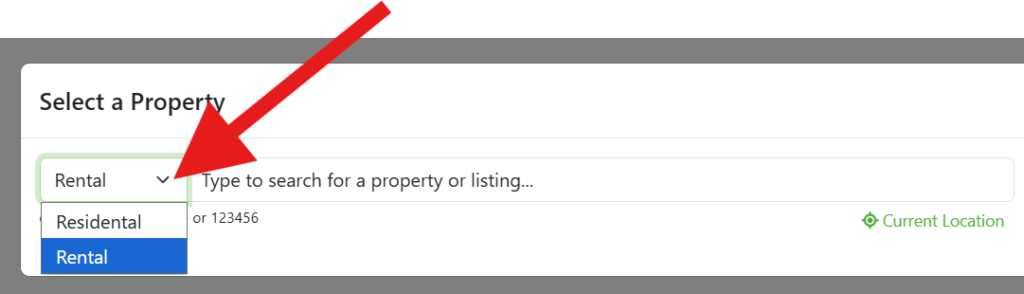
If your CMA report is showing rental data instead of home sales, your property type selector is likely set to “Rental.” You can quickly switch your report back to a standard home purchase or residential view right from the New Report generator.
To switch from a lease/rental to a residential home report (or vice versa):
- Start a new report.
- As you enter the address or MLS#, look for the selection box to the left of the input field.
- This box typically defaults to Residential (for a standard home purchase).
- If you want to switch and run a Rental/Lease report instead, simply click the box and select Rental.
NOTE: Residential and Rental versions of CMAsnap are separate products.
You may purchase either one as a stand alone subscription or run them together to effortlessly master both residential home sales and the lucrative lease market.
-
FAQ Reports
- Can I change the search radius?
- Can I search by subdivision?
- Why is my report looking at rentals or leases?
- How do I add/remove columns in my comp selection table?
- How do I run a rental CMA in CMAsnap?
- How do I send a report to a client?
- Nothing happens when I click "New Report."
- The location of my property is not correct, what do I do?
- When I click the email button, nothing is happening, or it tries to open some other email app?
- Why am I getting the wrong listing when I type in the address?