
How do I send a report to a client?
CMAsnap is deliverable in two different reports. You can share a report by printing it or sending a link via email or text.
We have a three-pager, we call the Short Report. It’s got all the analytics in it. When you send via a link or an email, the client can click into it and see everything. It’s all dynamic and best for digital delivery (by email or text). You can also download, or embed them into a listing page website. If you print the report – you will be limited on which pictures you can see.
The Long report, has more style. they are great for open houses, and they’re a great conversation starter. The only difference really is that they’ve got a detailed page on all of the comps, along with the other analytics.
Pro Tip: Not ready to reveal your Listing Price Recommendation? You can remove the list price from your report before you send it to your client.
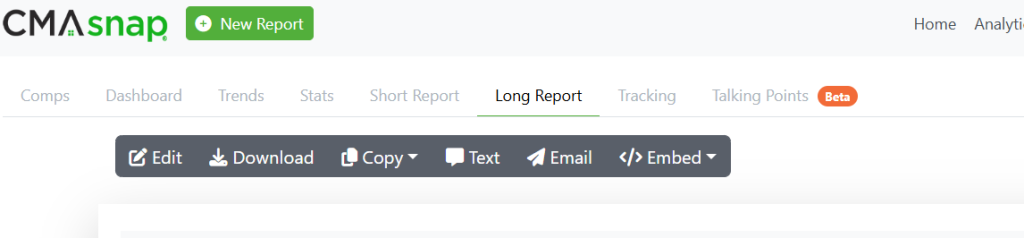
Select Short or Long Report in your Property navigation and choose Edit in the grey bar.
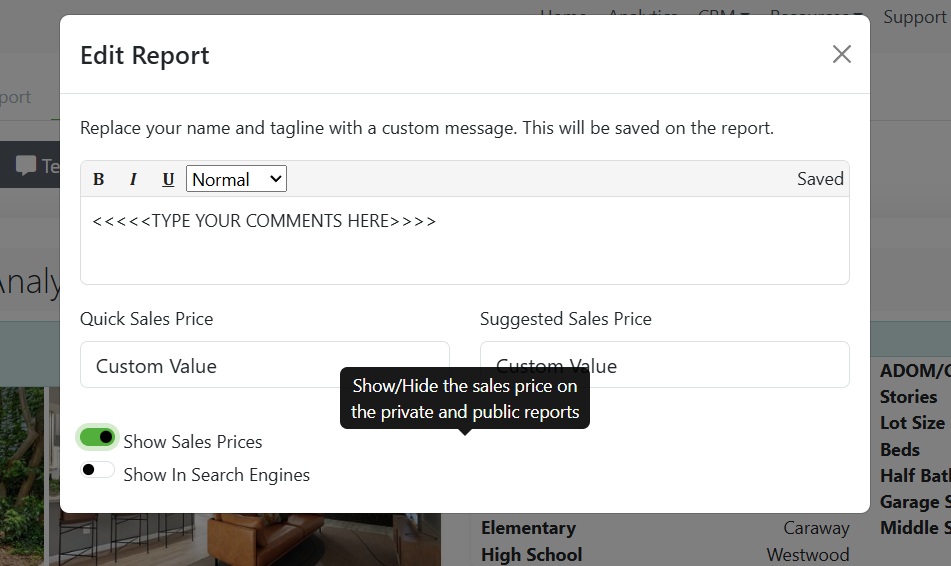
You will get a pop-up window that allows you to add comments and/or you can use the green toggle button to show or hide the recommended Sales Price.
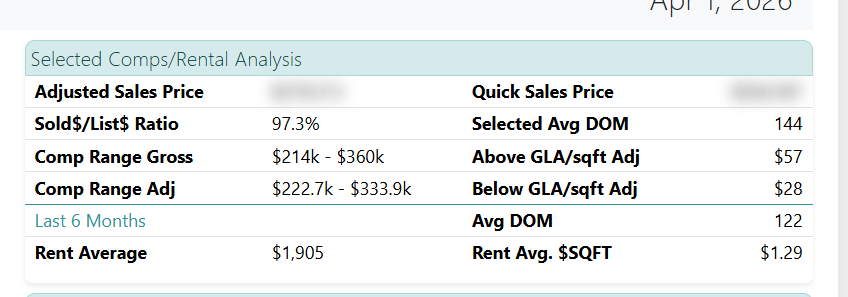
You can see below how it blurs out the sales price in your report. This works in the short or long report.
-
FAQ Reports
- Can I change the search radius?
- Can I search by subdivision?
- Why is my report looking at rentals or leases?
- How do I add/remove columns in my comp selection table?
- How do I run a rental CMA in CMAsnap?
- How do I send a report to a client?
- Nothing happens when I click "New Report."
- The location of my property is not correct, what do I do?
- When I click the email button, nothing is happening, or it tries to open some other email app?
- Why am I getting the wrong listing when I type in the address?